Indexing Databases

Does your database look like this….

index

If so, I think I might be able to help you fix it.

Databases help us store large amounts of data.  But when storing large amounts of data, it can become difficult to easily access the specific data you might be looking for.  The more unorganized your database is, the longer it will take to retrieve data.  Lucikly there is an easily solution….

Indexing!

Indexing is a way to organize your database and allows fast retrieval of information. Indexing also allows you see/show relationship between different data sets.  Without indexing your database, especially if you have an extremely large database, it could take a very, very long time to retrieve data.  For most cases, it is a good idea to implement indexing. (We’ll go over the pro’s and cons a little later).  If you’re thinking about indexing a databas, especially if you haven’t made the database yet, it’s best to lay out a plan to see how you want to index and relate different sets of data.  What tables will be related or point to each other?  The hardest part of indexing is coming up with a plan.  Now that you’ve figured out how you want to organized your indexing, lets take a look at some code.

Adding an index is very easy!

If we have a database named Cats, and you wanted to create an index between the cat’s name and breed you can do it as such:

CREATE INDEX index_cats ON Cats (name, breed, …);

If you need an index with unique properties you can do this:

CREATE UNIQUE INDEX index_cats ON Cats (catID);

And that’s it!  We now have some indexes!  The sky’s the limit….BUT…you don’t want to get too crazy with your indexes.  More isn’t always better….

Pros and cons to indexing:

The main pro of indexing is why we usually use indexing in the first place.  With indexing you will have a fast read time.  You can quickly query and retrive data.  As an example, if you had huge database, without indexing it could take daaaays to query but with good indexing you could cut that down to just a few hours of querying.

A con of indexing is having a slow write time.  Indexes are sorted.  If you’ve indexed your database but then have to insert data, not only do you have to write more code to reference both the column but also the index but it may take a while to find the proper place in the sorted data when the new data needs to go.

But what do I do if I created too many indexes?!?! TOO MANY INDEXES!!!

Well, luckily for you, I can also help you with that as well!  It is very easy to delete an index!.   All you need to do is:

DROP INDEX index_catID on Cats

It’s that easy to fix your database if you got too excited about indexing and regretted it afterwards (we’ve all had those mornings).

In conclusion:

When creating a database you should think about what type of data you will be storing, whether you will be adding to the database alot and how much data you will have.  There are some cases where you may not want to index your database but in general I think it is usually a good idea to index your databases.


 

indexes


Renderings a list in React

First let’s start off by talking about React.  What is React? React is a useful library in Javascript that let’s us build better interactive user interfaces (UI).  React was created by Facebook enginerr Jordon Walke.  Two featers of React is the use of JSX (think of JSX as a mixture of javascript and html) and the use of a virtual DOM.

Now, let’s talk a little bit about rendering. Rendering lets you transform your React components into DOM nodes so that the browser can read and understand your code and then display it on the screen. In other words, rendering is what puts the code we write onto the UI.  React classes are objects that will usually always have a render function.   The render function will return a value or list of values that will appear on the screen.

We can now see how to render a list.  In the example below we create a class (Cats).   In the Cat class object we have our render function that returns a list of cats.  This is a very basic way of rendering a list and this example is hardcoding the list.  There may be some situations where you may need or want to do this, but in general it is better to render a list dynamically so that the items of the list can be easily changed.

Var Cats = React createClass({
    render: function(){
        return (
    <ul>
<li> Pickles</li>
<li> Noodles</li>
<li> Pumpkin</li>
    </ul>

        )
    }
})


It’s best to render a list dynamically so that it can be easily changed from other parts of your code.  Within the class you will want to establish the state.   In this example, within the state, we have an object amd I set the value to an array of cats.   Within the render we are able to access that array within the state by writing this.state.cats.  We then use map to access each value. Using map we can use JSX to get each cat an <li> tag, which creates the list for us.   Later, if we need to add a cat or remove a cat from our class, instead of having to go to our render function and change that list, we can access the array in our state and that way all of the information will be updated anywhwere the class and state or references.  Where as if we changed the information within the render function, the state would not change and that could potentionally cause bugs in our program.

import React, { Component } from “react”;

class Cats extends Component {
  state = {
    cats: [“Pickles”, “Noodles”, “Pumpkin”]
  };
render() {
    return (
  <ul className=“cat-list”>
          {this.state.cats.map(cat => (
            <li
              key={cats}
              className=“list-of-cats”
            >
              {cats}
            </li>
          ))}
        </ul>
   );
  }
}

In conclusion, if you need to render a list, it is best to do it dynamically using state.  React is a very handy javascript library that allows you to use JSX to help make a funcitonal UI.   A big componant of react is the render function and it is very helpful for rendering lists for our apps.

Pseudoclassical Instantiation

Pseudoclassical Instantation

classical cat TO USE

First of all, what is instantiation? Instantiation is a way to make objects and methods. There are several instantation patterns but generally when people talk about instantiation patterns they usually talk about these 4:

  • functional
  • functional-shared
  • prototypal
  • pseudoclassical

Out of these 4 instantiation patterns, pseudoclassical is the most recommended.  Pseudoclassical instantiation is a little cleaner and less code to write and because of this it is the recommended pattern to use.  Some key componants for pseudoclassical insantiation is the key words “this”,  “new” and “prototype”.   Lets look at some code:

Var Cats = function(name, , food){
this.name = name;
this.color = color;
this.food = food;
}

Cats.prototype.eatFood = function(){
Return `I’m a cat and I eat ${this.food}`
};

var pickles = new Cats(‘Pickles’, ‘Siamese’, ‘Pizza’);
    pickles.eatFood();       // ‘I’m a cat and I eat Pizza’

Stacks and Queues

In computer science there are many different types of data structures to help us store and organize information.  Two common data structures are stacks and queues.  Stacks and queues are simple data structures.


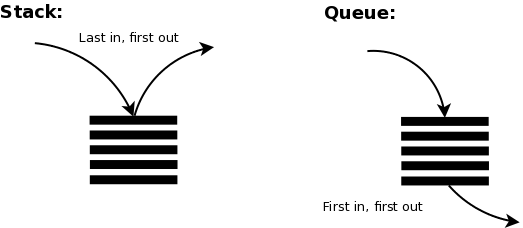
stack and queue pic

Let’s talk about Stacks

Stacks are called LIFO (last in, first out). Think of stacks like a stack of plates.  In order to reteive data you, you have to pull from the top.  With a stack of places you can’t just pull a plate out from the middle of a stack of plates, you have to pick up the top one.  A stack data structure is the same.  You have to take each element from the top.

A stack is an object that holds data.  Within the stack you have to have a storage variable which can be an array or an object.  Stacks are used because they take up less space in memory.  They are also good to use because, at least for retrieving and adding data and a 0(1), or constant time complexity.  An example of when we might use a stack is like the back button on our browswer.  If you are on a website, let’s say Facebook, but then you go to Twitter, then you go to Gmail.  If you hit your back button, it will take you from Gmail, to Twitter, not Facebook.  The back button will take you to the last page you visited.  Last in, first out.

Stacks have several methods that can be used to access and change data within the stack.  Some of those methods are:

  1. Push (adds data to the stack)
  2. pop (removes data from the stack)
  3. peek (lets you see the last element in the stack)
  4. size (tells you the size of the stack)

Queueueueueueueueus

Queues can be looked at like a line of people.  Queues are FIFO (first in, first out).  Much like people who get in a line for something, such as going into a movie theater, generally the first person who gets in the line will be the first people who gets to enter the movie theater.  Queues are the same way. The first bit of data entered will be the first one accessed.

Queues are also objects that hold a storage variable that can either be an array or object.  Queues also have a 0(1), or constant time complexity, when retrieving or adding data. An example of something that might use a queue is an event handler.  If you have a website that has several different interactive parts, such as clicking different spots, or entering texts, the site could use a queue to handle each event, one at a time, in the order in which they were triggered.  If you type something in a box with a submit button, and then click on a button that maybe takes you to another page, the site will process the click on the submit button first, then it will take you to the other page.

Queues also have methods that can be used to manipulate data:

  1. enqueue (adds values to queue)
  2. dequeue (removes a value from queue)
  3. size (gives the size of the queue)
  4. contains (used to see if a value exists in the queue)